Gesture-Control RC Robot Toy: Program, Play & USB Charge
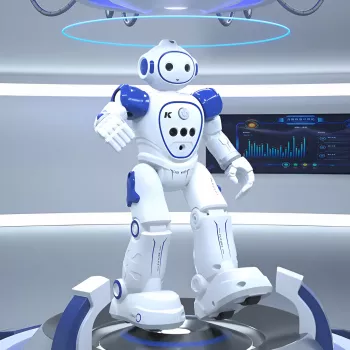
Gesture Sensing Smart RC Robot Toy with Programmable Features & USB Charging
A smart RC robot can turn everyday play into a mix of movement, creativity, and early problem-solving. With gesture control, programmable actions, and USB charging, this kind of robot feels less like a one-and-done novelty and more like a toy kids return to—especially when they can “teach” it a routine and show it off. Below is a practical guide to how these features behave in real rooms, how to get started quickly, and what to consider for different ages and play spaces.
What Makes This Robot Toy Different
The biggest draw is how quickly it gets kids from “unboxing” to “doing something cool.” Instead of relying on complex button combinations, gesture sensing typically lets kids guide the robot with natural hand movements. Add programmable routines and USB charging, and you get a toy that supports both spontaneous play and repeatable, shareable “performances.”
- Gesture sensing control for quick, intuitive movement without memorizing button sequences
- Programmable features that let kids build action routines (moves, turns, sequences) and replay them
- USB charging for easy power-ups at home, in the car, or with a power bank
- Smart-play appeal: blends remote-control fun with early logic and sequencing skills
- A strong gifting pick when you want entertainment plus repeat play value
If you want to see the current details, the Gesture Sensing Smart RC Robot Toy with Programmable Features & USB Charging is in stock and priced at $35.51.
Gesture Control: How It Works in Everyday Play
Gesture sensing on robot toys typically uses a handheld controller that detects tilt and direction changes, then sends commands to the robot. In practice, it feels more like “guiding” than driving a racing RC car—and that’s a good thing for kids who want instant reactions and fun tricks.
- Best-use scenarios: quick turns, forward/back movement, playful “follow” patterns, and simple room-to-room routes
- Setup tips that reduce frustration: play on a flat surface, keep the controller within line-of-sight, and avoid harsh direct sunlight if sensors are light-sensitive
- Practice path: start with forward/back gestures, add turns, then combine into short routes
- What to expect: gesture play is interactive and expressive; it’s less ideal for tight obstacle courses that require precise micro-adjustments
| Feature | Gesture Control | Button Remote |
|---|---|---|
| Learning curve | Fast to pick up | Can be faster for experienced users |
| Precision | Moderate | Higher for exact maneuvers |
| Fun factor | High (interactive) | High (classic RC feel) |
| Best for | Tricks, casual play, demos | Tight navigation, repeatable paths |
Programmable Features: Turning Play Into Simple Coding Skills
“Programmable” on a robot toy usually means you can record a sequence of actions—like forward, turn, spin, dance—then play it back. Kids quickly learn that order matters: one extra turn changes the whole routine, and starting from a different spot can make the robot “miss its mark.” That’s a gentle, hands-on introduction to sequencing and debugging.
- Programming mode often records steps in order and replays the routine on command
- Skill-building: introduces ordering, cause-and-effect, and troubleshooting when the routine doesn’t run as expected
- Routine ideas that stay fun longer: “room patrol,” “dance-off,” “delivery run,” or an “obstacle weave” using books and small boxes
- Smoother routines: keep sequences short at first, test after each step, and adjust spacing between obstacles
- Group play: one child designs the routine while another predicts the result, then swap roles
A simple way to level up: have kids name their routines and “perform” them for family. The moment they care about repeating the same result, they naturally start experimenting with consistency—starting position, spacing, and step order.
USB Charging and Battery Basics
| Task | Why it matters |
|---|---|
| Charge before first use | Helps performance and consistency |
| Keep charging area ventilated | Reduces heat buildup risk |
| Wipe wheels/sensors lightly | Improves tracking and motion |
| Store away from heat | Protects battery lifespan |
Who It’s For: Ages, Interests, and Play Spaces
For a tech-themed gift bundle, consider pairing the robot with another pocket-friendly device like the Bluetooth MP3 MP4 Player with 4.0″ Touchscreen (also in stock), depending on the child’s age and household rules for media devices.
Setup, Troubleshooting, and Safe Play Tips
For broader toy safety guidance, helpful references include the U.S. Consumer Product Safety Commission toy safety resources and the ASTM F963 toy safety specification overview.
Product Snapshot
| Item | Details |
|---|---|
| Product | Gesture Sensing Smart RC Robot Toy with Programmable Features & USB Charging |
| Price | 35.51 USD |
| Availability | In stock |
| Product page | View product |
If you’re shopping for small, practical tech extras, the Mini 8GB Voice Recorder Digital Audio MP3 Player USB Pen with Earphones is another in-stock option that fits easily into a backpack or desk setup.
FAQ
Does gesture control work better on certain surfaces?
Smooth, level floors usually give the best results because the wheels can roll evenly and the robot can maintain a consistent direction. Thick carpet or uneven surfaces may reduce traction and make movement less predictable, so testing a small area first helps.
How do programmable routines usually work on a robot toy like this?
Programming typically records steps in order (moves, turns, and actions) and then replays the sequence when triggered. Start with short routines and keep the robot in the same starting position to make the playback more consistent.
Can it be charged from a power bank or laptop USB port?
USB charging generally works with standard USB sources like a power bank or a laptop port, as long as the power output is appropriate for the toy. Follow the included charging instructions and supervise charging for younger children.


Leave a comment